
Applied AI Example: Literature Searching & Automating Reference Manager with Claude
By:
Alexander Scheer, CISSP, CISM, AAISM, QTE 501
Mantle AI, Inc.
In this post, I’ll walk through two related workflows:
Using Claude and MCP to make literature search less painful, especially when working across open-access sources.
Using Claude Code with a reference manager to maintain, update, and extract more value from a research corpus. In my case, that reference manager is Zotero, though the same pattern should translate to other tools. There are also open-source MCP projects for Mendeley and EndNote; I couldn’t find one for ReadCube. The configuration will differ, but the underlying concept is the same.
Where this is relevant:
This is most useful in disciplines where research is a core part of the job and where the volume of material starts to benefit from LLM and agentic capabilities: synthesis, abstraction across APIs and sources, pattern identification, and the ability to reason across messy data sets.
For years, I’ve been frustrated by the inefficiency of literature searching: finding papers, downloading them, tagging them, keeping them sorted in my reference manager, and then later going back to figure out what I saved, why I saved it, and which papers are actually relevant to a particular topic.
My search process has also always been frustrating. The results are inconsistent, and I often do not find what I’m looking for because, in part, I can’t describe my inquiry in natural language. Or, more accurately, I can describe it in natural language — just not in the exact combination of terms, Boolean operators, and database-specific query magic required to obtain a useful result.
On one hand, this is almost certainly a “me” problem.
On the other hand, the beauty of AI is that it lets you spend more time on the meta-layer: the goal you’re trying to achieve, the problem you are trying to solve, the question you’re trying to answer, and the output you would like. This translates to spending less time on non-differentiated activities like fine-tuning a laborious workflow, wrangling custom Python scripts, and convincing myself that my time is being time spent wisely on this activities.
I’ve been experimenting with two tools that seem to augment my specific working pattern, with Zotero serving as my reference manager:
MCP for Zotero
paper-search-mcp
Having now combined them with a simple workflow in Claude, I’m starting to see real efficiencies — and, more interestingly, a new way to breathe life into the research corpora I’ve been building in Zotero: the pile of papers, notes, websites, PDFs, videos, and other “I should come back to this later” material.
I know this will have utility for others, particularly in fields like biotech, where we almost exclusively work.
So, this is a writeup of how the workflow works for me, including how it enabled an actual literature search inquiry I had and helped me get the discovered content into my reference manager.
My Prompt
“I’m looking for papers related to the latest applied thinking on ICH E6 R3 as a clinical-trial Sponsor with a consortium of third-party partners — CROs, clinical sites, regulatory consultants, and the like. To the extent possible, find papers covering wearables. I’m looking for at least 5 papers.”
The tools
Both of these connect to Claude through the Model Context Protocol (“MCP”), which is an open standard that lets an AI assistant reach outside tools and data without anyone having to mess with each connection through progammatic interfaces ("APIs"). The built-in connectors in Claude all use MCP.
The first, paper-search-mcp, is an open-source project built on a free-first principle, which is to say it leans on open and public sources before it reaches for anything paid.
What is great about it is that I can give it a single query in natural language, and it fans that query out across more than twenty open scholarly sources at once, among them arXiv, PubMed, Crossref, OpenAlex, Europe PMC, bioRxiv, and Semantic Scholar, then it deduplicates whatever comes back and pulls the open-access full text wherever a lawful link exists.
Note: See the end of this blog for the matrix from the paper-search-MCP repository on what’s supported.
The second, the Zotero connector, is a hosted proxy that sits in front of the Zotero API, and by the author's own description it holds nothing beyond encrypted credentials. Once it is connected, Claude can search my library, drop items into a specific collection, tag them, write notes against them, and pull citations back out.
This is where I started to see additional value once the paper searching had completed. I feel it really has unlocked a new dimension to the data in my reference manager, including how to get information in there, tagged, and annotated.
The sample workflow
The workflow around the two tools is simple...
Claude Desktop: Write prompt geared around your paper search inquiry. I recommend turning off other MCP connectors and only leaving the paper-search-mcp connector enabled as Claude tends to try other tools when hitting roadblocks.
Claude Code: Copy the table into Code and prompt it to “verify links/DOI references, download, import into [name of] collection, tag, and annotate with notes”.
Now, I recognize this could be integrated through Claude Cowork, bridging both connectors, but I personally prefer the terminal a lot of my AI work, so that is a style choice I’ve made. Conversely, I could also exclusively use Claude Code for the paper-search-mcp component, but I was interested in trying it in the Claude Desktop console. There is no single answer in this AI landscape - it is truly about experimenting and following what works for you.
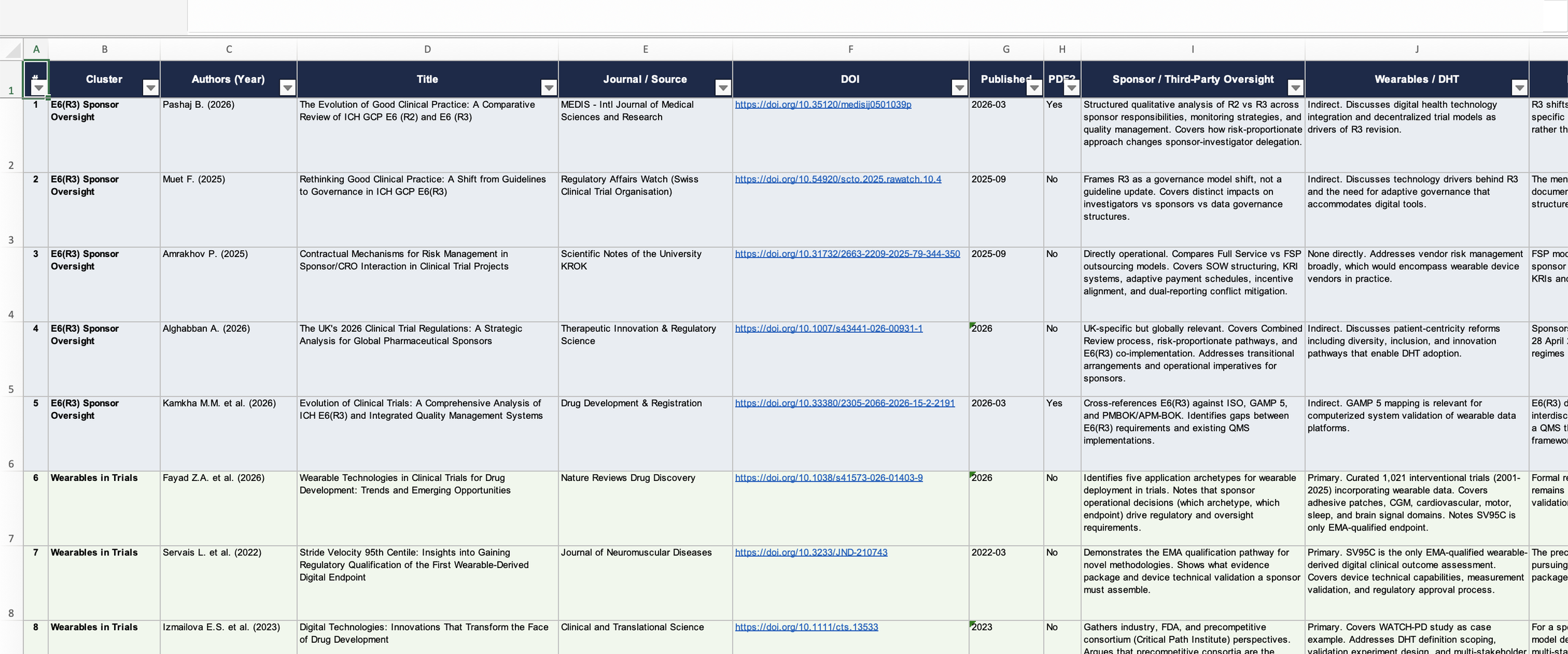
Claude Desktop - Tabular File
That table then goes into Claude Code, and from there the Zotero connector does the admin part:
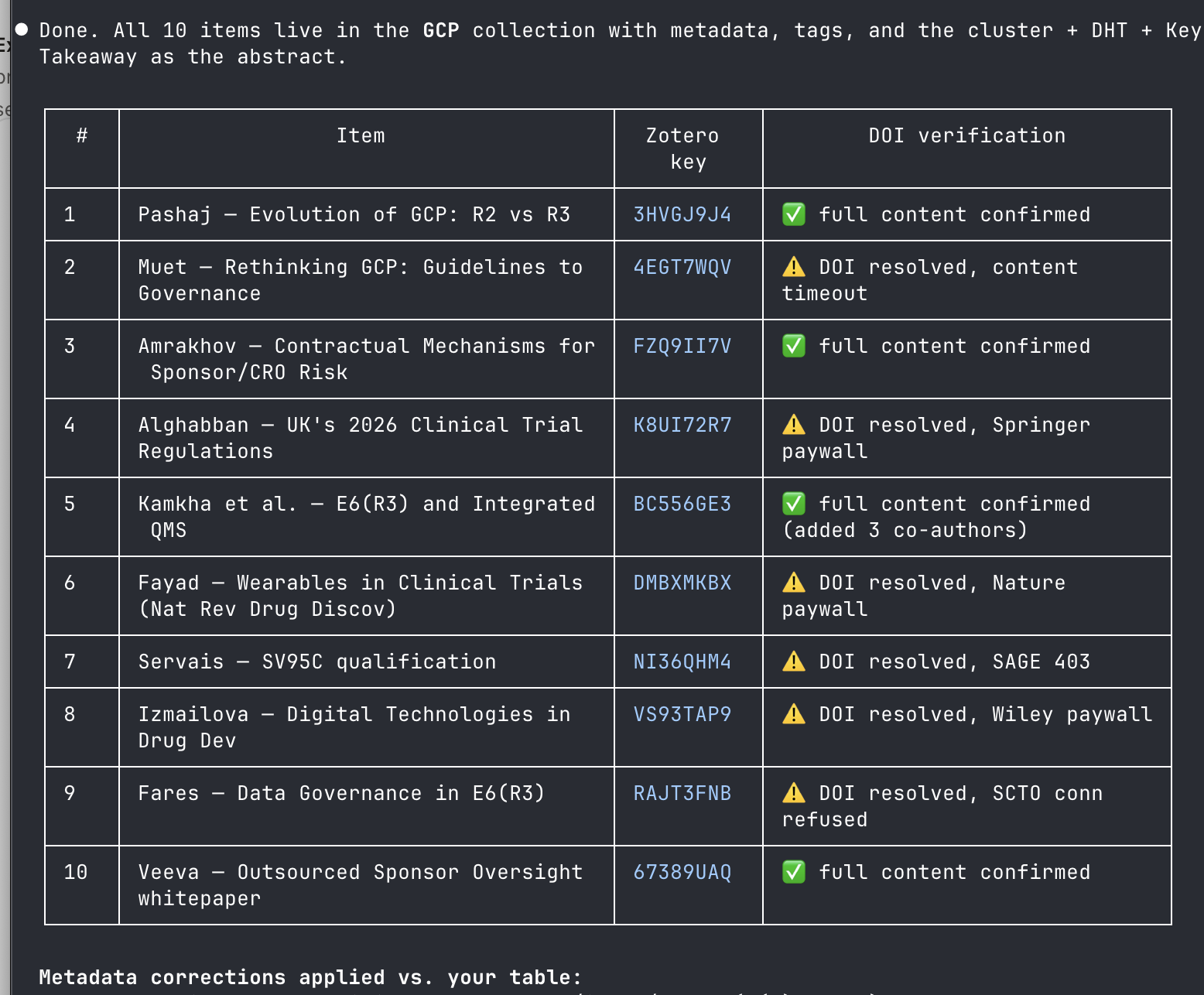
a) verify DOIs with WebFetch tool
a)pulling each paper
b) filing it into the right collection
c) tagging it
d) writing notes into the entries
Example below from Claude Code after it imported all items into my GCP collection:
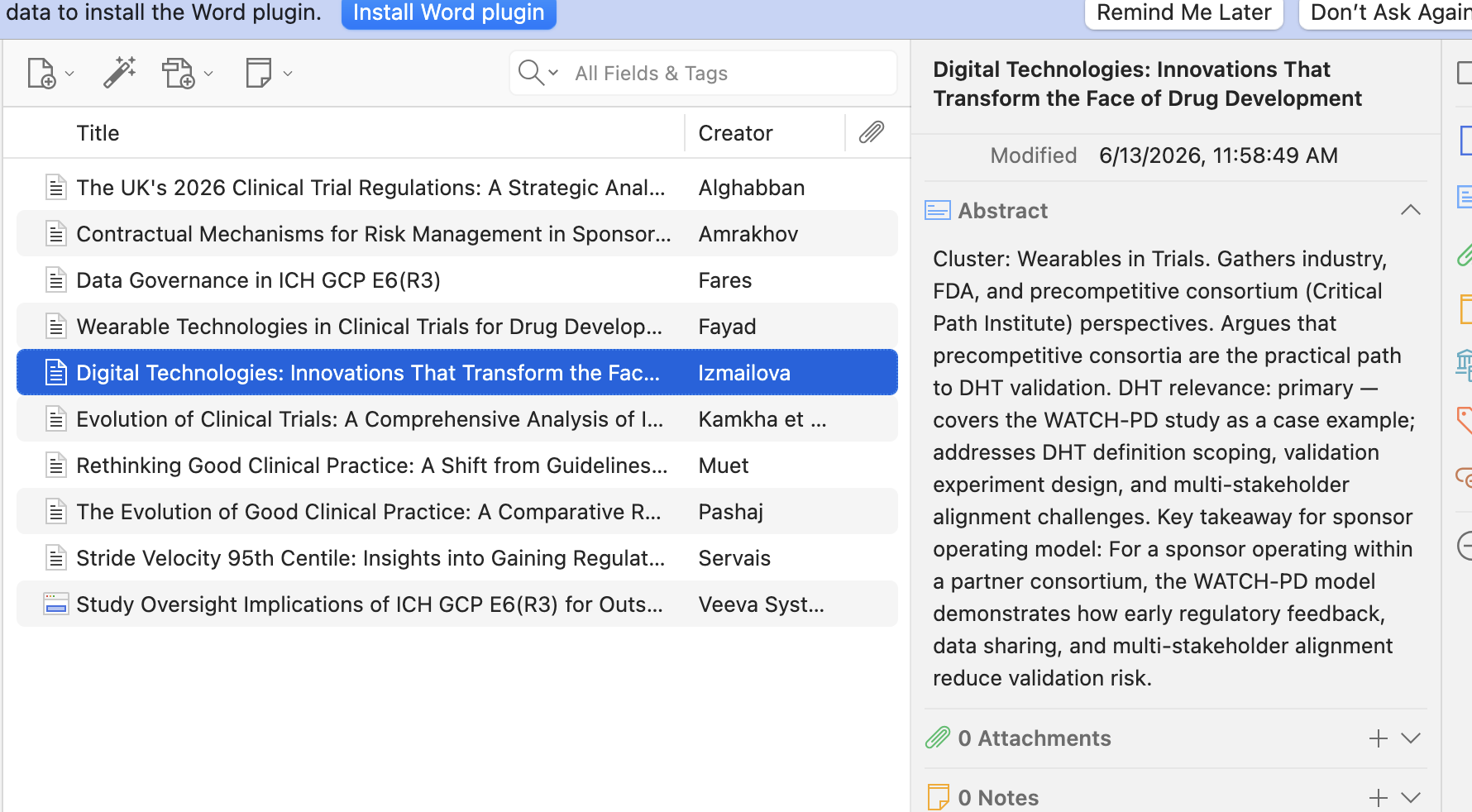
And this is the data from the Zotero perspective:
What else the Zotero connector is capable of?
Core Capabilities
Search Your Zotero Library
MCP for Zotero can search across your Zotero library using natural-language requests.
It can help find items by:
Title
Author
Topic
Year
Tag
Collection
PDF content, where indexed by Zotero Desktop
Add New References
The tool can add new items to Zotero through natural-language descriptions.
Instead of manually entering metadata, the assistant can help look up and create records for:
Journal articles
Books
Theses
Papers
Other reference types supported by Zotero
It can also help with DOI lookup and metadata population.
Organize Collections
MCP for Zotero can help create and manage Zotero collections.
It can support workflows such as:
Creating a new collection
Adding items to a collection
Moving papers into a specific research folder
Organizing references around a topic or project
Manage Tags
The tool can apply and update tags on Zotero items.
This is useful for building more structured research libraries around themes, source types, or review status.
Update Metadata
MCP for Zotero can help update item metadata in Zotero.
This can include cleaning up or enriching records with better information, such as:
Title
Author
Publication year
DOI
Item type
Publication venue
Tags
Notes
This is particularly useful when references are imported with incomplete or messy metadata.
Export Citations and Bibliographies
The tool can export citations and bibliographies from Zotero.
Supported export examples include:
BibTeX
RIS
APA
Chicago
Other formatted citation styles supported through Zotero
Work with Group Libraries
MCP for Zotero can access Zotero group libraries in addition to a personal library.
This is useful for collaborative research workflows where a shared Zotero library is used by a team, lab, company, or project group.
Search Inside PDFs
Where Zotero Desktop has indexed PDF content, the tool can search inside PDFs.
This makes it possible to ask for papers based not only on citation metadata, but also on concepts or language contained in the actual paper text.
APPENDIX A - Getting Started
Zotero MCP Connector
Go to the creator’s site: https://mcpforzotero.alejandroarnaud.dev/
Sign-up with Google OAuth (asks for basic profile information). If you find you don’t want to continue using tools, you can clean-up the OAuth authorization in your Google account here: https://myaccount.google.com/connections
Create the Zotero token: https://www.zotero.org/settings/security#applications. Click on “Create a new private key”
Add the token to the configuration screen on mcpforzotero.com: “Connect your Zotero library”
Create the access tokens for Claude - one for Desktop, one for Code: “Access Tokens”
Copy the generated configurations below the “Access Tokens” section for your applicable terminal - Claude Desktop, Code, ChatGPT
For Claude Desktop, you can find the configuration file here:
OSX: ~/Library/Application Support/Claude/claude_desktop_config.json
Windows: %APPDATA%\Claude\claude_desktop_config.jsonFor Claude Code, you can find the configuration file here:
~/.claude.json
or, at your project root for a given project: mcp.jsonClose Claude and re-open it
Paper Search MCP
Load as a Claude Code skill:
Step 1 — Clone the repo:
git clone https://github.com/openags/paper-search-mcp.git ~/paper-search-mcpStep 2 — Install the skill:
mkdir -p ~/.claude/skills/paper-search
cp ~/paper-search-mcp/claude-code/SKILL.md ~/.claude/skills/paper-search/SKILL.md
Step 3 — Update the repo path in the skill:
Edit ~/.claude/skills/paper-search/SKILL.md and replace every <REPO_PATH> with the absolute path to your clone (e.g. /Users/yourname/paper-search-mcp).
Install Using Smithery and Node
npx -y @smithery/cli install @openags/paper-search-mcp --client claudeSmithery automatically writes the correct config block for you. No manual JSON editing needed.
APPENDIX B - Paper Search MCP
Platform Capability Matrix
This matrix reflects verified live-integration results from functional and end-to-end regression tests in this repository. Columns show the highest capability level observed under normal conditions.
| Platform | Search | Download | Read | Notes |
|---|---|---|---|---|
| arXiv | ✅ | ✅ | ✅ | Open API; reliable |
| PubMed | ✅ | ❌ | ⚠️ info-only | Open API; reliable |
| bioRxiv | ✅ | ✅ | ✅ | Open API; reliable |
| medRxiv | ✅ | ✅ | ✅ | Open API; reliable |
| Google Scholar | ⚠️ | ❌ | ❌ | Bot-detection active; set PAPER_SEARCH_MCP_GOOGLE_SCHOLAR_PROXY_URL |
| IACR | ✅ | ✅ | ✅ | Open API; reliable |
| Semantic Scholar | ✅ | ✅ (OA) | ✅ (OA) | Works without key (rate-limited); key improves limits; key rejection (403) retried automatically without key |
| Crossref | ✅ | ❌ | ⚠️ info-only | Open API; reliable |
| OpenAlex | ✅ | ❌ | ⚠️ info-only | Open API; reliable |
| PMC | ✅ | ✅ (OA only) | ✅ (OA only) | OA PDFs only; direct download may be blocked by some proxy environments |
| CORE | ✅ | ✅ (record-dependent) | ✅ (record-dependent) | Free key recommended; connector retries with backoff and falls back to key-less on 401/403 |
| Europe PMC | ✅ | ✅ (OA) | ✅ (OA) | OA PDFs only; direct download may be blocked by some proxy environments |
| dblp | ✅ | ❌ | ⚠️ info-only | Open API; reliable |
| OpenAIRE | ✅ | ❌ | ❌ | Open API; retries 3× with escalating request profiles on transient 403 |
| CiteSeerX | ⚠️ | ✅ (record-dependent) | ⚠️ | API endpoint intermittently unavailable / redirects to web archive |
| DOAJ | ✅ | ⚠️ (URL-dependent) | ⚠️ (URL-dependent) | PDF availability varies by article; free key raises rate limits |
| BASE | ⚠️ | ✅ (record-dependent) | ✅ (record-dependent) | OAI-PMH endpoint requires institutional IP registration; returns empty gracefully otherwise |
| Zenodo | ✅ | ✅ (record-dependent) | ✅ (record-dependent) | Open API; reliable |
| HAL | ✅ | ✅ (record-dependent) | ✅ (record-dependent) | Open API; reliable |
| SSRN | ⚠️ | ⚠️ best-effort | ⚠️ best-effort | 403 bot-detection active; public PDF only |
| Unpaywall | ✅ (DOI lookup) | ❌ | ❌ | Requires PAPER_SEARCH_MCP_UNPAYWALL_EMAIL |
| Sci-Hub (optional) | ⚠️ fallback-only | ✅ | ❌ | Optional; unstable mirrors; user responsibility |
| IEEE Xplore 🔑 | 🚧 skeleton | 🚧 skeleton | 🚧 skeleton | Requires PAPER_SEARCH_MCP_IEEE_API_KEY to activate |
| ACM DL 🔑 | 🚧 skeleton | 🚧 skeleton | 🚧 skeleton | Requires PAPER_SEARCH_MCP_ACM_API_KEY to activate |
✅ = reliable in live tests. ⚠️ = works but subject to upstream instability or access restrictions. ❌ = not supported. 🔑 = key required. 🚧 = skeleton only.
Credential & API Key Requirements
All keys are optional unless noted. Configure them in .env (preferred) or as shell exports.
| Environment Variable | Provider | Required? | How to obtain |
|---|---|---|---|
PAPER_SEARCH_MCP_UNPAYWALL_EMAIL |
Unpaywall | Yes (Unpaywall disabled without it) | Any valid email; register at unpaywall.org |
PAPER_SEARCH_MCP_CORE_API_KEY |
CORE | Recommended | Free at core.ac.uk/services/api |
PAPER_SEARCH_MCP_SEMANTIC_SCHOLAR_API_KEY |
Semantic Scholar | Optional | Free at semanticscholar.org — improves rate limits |
PAPER_SEARCH_MCP_GOOGLE_SCHOLAR_PROXY_URL |
Google Scholar | Optional | Your HTTP/HTTPS proxy URL — bypasses bot-detection |
PAPER_SEARCH_MCP_DOAJ_API_KEY |
DOAJ | Optional | Free at doaj.org — raises hourly rate limit |
PAPER_SEARCH_MCP_ZENODO_ACCESS_TOKEN |
Zenodo | Optional | Free at zenodo.org — required for private records |
PAPER_SEARCH_MCP_IEEE_API_KEY |
IEEE Xplore | Required to activate | Free at developer.ieee.org |
PAPER_SEARCH_MCP_ACM_API_KEY |
ACM DL | Required to activate | See libraries.acm.org/digital-library/acm-open |
All variables follow the PAPER_SEARCH_MCP_<NAME> prefix scheme. Legacy names without the prefix (e.g. CORE_API_KEY, UNPAYWALL_EMAIL) are still supported for backward compatibility.
Known Upstream Limitations
Some search failures are caused by external provider instability, not by bugs in this project:
| Source | Symptom | Cause | Workaround |
|---|---|---|---|
| Google Scholar | Returns 0 results / empty HTML | Bot-detection (CAPTCHA) | Set PAPER_SEARCH_MCP_GOOGLE_SCHOLAR_PROXY_URL to a proxy |
| Semantic Scholar | 429 rate-limited responses | Anonymous access rate limit | Set PAPER_SEARCH_MCP_SEMANTIC_SCHOLAR_API_KEY; if key is rejected (403) connector automatically retries without key |
| CORE | 500 / timeout errors | Unauthenticated rate limiting | Set PAPER_SEARCH_MCP_CORE_API_KEY (free); connector retries with exponential backoff and falls back to key-less on 401/403 |
| OpenAIRE | Transient 403 responses | IP-based session rate limiting | Connector retries 3× per profile, escalating: plain session → XML Accept header → raw requests.get with Mozilla UA |
| CiteSeerX | 404 via web archive redirect | PSU endpoint intermittently redirects to archive | No workaround; connector returns empty gracefully |
| BASE | Search returns 0 results | OAI-PMH endpoint requires institutional IP registration | Register at base-search.net for API access; connector returns empty gracefully otherwise |
| SSRN | HTTP 403 | Bot-detection (Cloudflare) | No workaround; connector tries two endpoints and returns a clear message on failure |
| PMC / Europe PMC | PDF download ProxyError | Local proxy blocking direct HTTPS PDF download | Disable proxy or use download_with_fallback instead |
| Unpaywall | Skipped entirely | UNPAYWALL_EMAIL env var not set |
Set PAPER_SEARCH_MCP_UNPAYWALL_EMAIL in .env |
Optional Paid Platform Connectors (Phase 3)
IEEE Xplore and ACM Digital Library connectors are included as opt-in skeletons. They are disabled by default — no API calls are made unless you explicitly configure the corresponding keys.
| Platform | Env Var | Status |
|---|---|---|
| IEEE Xplore | PAPER_SEARCH_MCP_IEEE_API_KEY |
🚧 skeleton — search registered, download/read raise NotImplementedError |
| ACM Digital Library | PAPER_SEARCH_MCP_ACM_API_KEY |
🚧 skeleton — search registered, download/read raise NotImplementedError |
